Showing posts with label lorenzo. Show all posts

Saturday, April 18, 2015

5 Tips To Maximize Your Cashback Card Benefits in Singapore

Source: Money$mart.sg

So you’ve heard cashback cards offer the best savings, and you want to switch. Or maybe you already have a cashback card, and you’re wondering why the only thing you’re saving up is added grief. Well, there’s a trick to it, because the benefits of a cashback card are more fragile than an alcoholic’s resolve. In this article, I look at how you can maximize your card’s savings, without having to get your CPA:

What’s a Cashback Card?

Cashback cards offer a cash rebate, which varies based on the amount you spend. So a cashback of 5% means you get back 5% of the amount charged to the card. This usually comes as a cheque, issued after each billing cycle.
Recent product launches have signalled a huge shift in favour of cashback rebates when consumers choose what credit card benefits they want. This is reflected in a whole glut of new credit cards, such as the American Express True Cashback Card, the ANZ Optimum Card andOCBC’s 365 Card. Of course, the oldies such as the Citi DIVIDEND Card are still holding strong amidst this heavy competition.
Cashback has an advantage over discounts, because discounts tend to go unused. For example, there’s no point getting 10% off at a restaurant you’ll never visit. Cashback just straight up puts money in your pocket, instead of plugging you with offers you don’t need.

Waitress taking orders
“Sorry, your card discount only applies on leap years, the Pope’s birthday, and when we feel like it.”

But you have to maximize it by:
  • Knowing the cashback limit
  • Knowing the terms and conditions of the cashback
  • Paying the balance in full
  • Being aware of introductory rates
  • Matching your spending habits

1. Knowing the Cashback Limit

In some cases, there’s a limit to the size of the rebate. The UOB ONE card, for example, has a maximum rebate of $600 a year. If you know your cashback has reached this amount, it’s time to switch to another card.
Calculate how much you can charge to the card before you hit the maximum rebate. Then get a little sticker or something, write down the amount, and paste it on the front of the card. Apart from reminding you when to switch, it’ll also remind you that you’re overspending. Because if you hit the maximum rebate, you probably are.

Coin bag
“There’s a cashback limit. And you just used it paying postage for your query letter.”

2. Knowing the Terms and Conditions of the Cashback

If you’re unlucky, you’ll get one of those half-assed rebate cards with more terms and conditions than the Versailles treaty. It’s easy to fall for this, because brochures tend to only advertise thehighest possible rebate.
The OCBC Robinson’s card, for example, only gives rebates at Robinson’s outlets. But that’s to be expected, being that it is called the Robinson’s card. Other cards may not be as honest or obvious. You don’t want to charge $500 of petrol to a card, then find out it’s 5% cashback for shopping and 0.5% cashback for petrol.
You should also check for minimum spending requirements. The UOB One card, for example, only starts giving cashback after you charge more than $300 to it. So don’t want to use it for a handful of $50 transactions, and get nothing back at the end of the month. Some other companies have taken advantage of this, with cards like the Amex True Cashback Card offering an unlimited cashback of 1.5% without requiring a minimum spend.

Huge thick book
“Before I send you the terms and conditions, do you have any history of back problems?”

3. Paying the Balance in Full

Some card companies suggest you let the cashback pay off the card’s interest. That’s possible, but it’s not recommended. Remember: it’s better to collect the interest than to try and offset it.
A cashback card rewards savers. If you’re actively blowing money on Martinis or the latest tablets, you’ll get higher average savings from a card that caters to that. It’s easy to find a card with 10-15% discounts at Courts or your favourite nightspot; it’s hard to find cashback rebates that high.
So if you’re using a cashback card, commit yourself to maximizing the savings. Pay off the balance in full and collect on the interest. If you intend to actively spend, and you know whereyou’re spending, then get a card with the appropriate discounts instead.
If you need help budgeting, follow us on Facebook. We can teach you some tricks.

Bills to pay
“…and the last repayment is a human sacrifice. Pretty cheap, this bank.”

4. Be Aware of Introductory Rates

Cashback cards sometimes come with introductory rates. Most often, this is 0% interest, or bonus $100 cashback. Some cards like the Amex True Cashback offer 5% cashback for a limited period of time and for a limited amount. As with point 2, don’t take anything on the brochure for granted.
Banks seldom advertise that introductory rates are temporary. In most cases, the huge rebates and 0% interest disappear after three months. Nor should you expect a warning from the bank; they’re just waiting for you to slip up, and they’ll implement new terms without so much as an e-mail. Think of bankers as muggers with really nice suits.
Your best bet is to grill the bank’s service rep on the details. If you’re really worried, hold the conversation with the rep via e-mail. This will give you evidence in case you’re mislead.

Credit card ad
“Sure it’s interest free. It comes with free 24% interest.”

5. Matching Your Spending Habits

As I mentioned in point 2, some cards offer different rebates for different purchases. Don’t pick a cashback card just because it gives a flat rebate on everything. These cards are versatile, but the rebate tends to be lower.
For example, the Amex True Cashback card gives the same rebate on every purchase, but the rebate is only 1.5% throughout. The OCBC Robinson’s card, on the other hand, only gives rebates at Robinson’s. But the rebate is up to 10%, right off the bat. Some new cards, such as the ANZ Optimum Card allow you to choose which category of spending you would like to enjoy the maximum cashback of 5% for, and then provide a separate cashback rate for other spending categories.
If you do most of your shopping at Robinson’s, then the Robinson’s card is the better deal. If you’re not specific in where you shop, then getting a more generic cashback card is better. Match the card to your spending habits, and don’t just pick the simplest one.

Shopping in Tokyo
“Wow, they know my shopping habits. The application form came with a bankruptcy notice.”

If you are interested in finding the best cashback credit card that suits your needs, you can always head over to credit card comparison sites like MoneySmart.

Thursday, April 11, 2013

Install Mountain Lion on a hackintosh !


iAtkos ML2 : OS X Mountain Lion 10.8.2 (10.04.2013)
iAtkos ML2 : OS X Mountain Lion 10.8.2 (10.04.2013) | 4.79 GB


iAtkos ML2 - OS X Mountain Lion 10.8.2 - the latest version of the most advanced operating system in the world. Mountain Lion includes over 200 new features that enhance your Mac.

With new Messages app, you can send text, photos, videos, contacts, links and documents to any user Mac, iPhone, iPad, or iPod touch - you can even start conversation on one device and continue on another. The new export button allows you to easily send links, web pages, photos, videos, and publish tweets directly through the application to which you are working.

The image of a quick "recovery" system on the hard drive!

in fact the system here, "restored" who is interested in - view the contents of "10.8.2.Base.pkg"

installation:
1. Burn to DVD9 *. Dmg image through TransMac
2. Boot from DVD9
3. Set (during installation, click Customize and select all desired kekstov)
4. Boot from a partition on the hard drive with the installed system
5. To use the system!

System requirements:
The Intel Core 2 Duo or higher (supports 64-bit architecture)
compatible graphics card
2 GB of memory (RAM)

Password to log into the system: do not require a database, enter any data!

http://uploaded.net/file/n1fpcvlq/iATKOS_ML2.part1.rar
http://uploaded.net/file/9c8iwvx9/iATKOS_ML2.part2.rar
http://uploaded.net/file/fv9m1s49/iATKOS_ML2.part3.rar
http://uploaded.net/file/3n3phbzx/iATKOS_ML2.part4.rar
http://uploaded.net/file/jv7hmy6x/iATKOS_ML2.part5.rar

Wednesday, January 9, 2013

Top 10 Torrent Websites of 2013


Continuing a long-standing New Year’s tradition, today we present an up-to-date list of the world’s most-visited BitTorrent sites. At the start of 2013 The Pirate Bay continues to pull in the most visitors, followed by KickassTorrents and Torrentz. Household names BTJunkie and Demonoid have dropped off the list as both sites are no longer online.
Which torrent sites get the most visitors at the start of 2013?
Traditionally BitTorrent users are very loyal, which is reflected in the top 10 where most sites have had a consistent listing for more than half a decade. This year there are a few movers and shakers, as well as several newcomers.
The most notable absentees this year are BTJunkie and Demonoid. Both sites have been featured in the top 10 since 2006, but went offline in 2012. BTJunkie permanently quit early last year and Demonoid’s future is also uncertain after it disappeared during the summer.
The first newcomer in tenth place is H33t, which has been growing steadily in recent years. The second newcomer is TorrentReactor, one of the oldest torrent sites around that makes its comeback after not making the list last year.
Then there is also a group of notable sites that didn’t make the cut, but deserve a mention.YIFY-torrents.com for example, which launched late 2011 and has grown exponentially since. Also worth mentioning are the Pirate Bay proxies, including Pirateproxy.net, which in itself almost deserves a spot in the top 10.
Below is the full list of the 10 most-visited torrent sites at the start of the new year. Only public and English language sites are included. The list is based on various traffic reports and we display the Alexa and U.S. Compete rank for each. In addition, we include last year’s ranking for each of the 10 sites.
Did we miss anything? Feel free to join the discussion below.

1. The Pirate Bay

To many people The Pirate Bay is the equivalent to BitTorrent. The site was founded in 2003 and is still expanding, despite the various legal troubles and new blockades in the UK and the Netherlands. The Pirate Bay currently has well over a billion page views a month.
Alexa Rank: 74 / Compete Rank: 398 / Last year #1

2. KickassTorrents

KickassTorrents was founded in 2009 and has moved up in our top 10 year after year. Responding to increasing worries over domain seizures, the site moved from its kickasstorrents.com domain to kat.ph in 2012. This year the site continued to grow, despite being blocked by Italian Internet providers.
Alexa Rank: 116 / Compete Rank: 719 / Last year #3

3. Torrentz

Torrentz has been the leading BitTorrent meta-search engine for many years. Unlike the other sites featured in the list Torrentz does not host any torrent files, it merely redirects visitors to other places on the web. The site uses several domain names with the .eu being the most popular.
Alexa Rank: 166 / Compete Rank: 882 / Last year #2

4. IsoHunt

Two years ago isoHunt became the first search engine forced to implement a keyword filterprovided by the MPAA. Despite this setback, isoHunt continues to be listed among the world’s top torrent sites. isoHunt is currently trying to get rid of the filter through the Appeals Court.
Alexa Rank: 213 / Compete Rank: 1,935 / Last year #4

5. ExtraTorrent

ExtraTorrent continues to gain more traffic and has moved up again in the top 10, now being the 5th most visited torrent site. This success didn’t go unnoticed to rightsholders groups such as the RIAA and MPAA who have called out ExtraTorrent as one of the top pirate sites recently.
Alexa Rank: 279 / Compete Rank: 1,973 / Last year #6

6. 1337x

1337x focuses more on the community aspect than some competitors. The site’s owners say they started 1337x to “fill an apparent void where it seemed there was a lack of quality conscience ad free torrent sites with public trackers.” The site moved up from spot 10 last year to 6th in 2013.
Alexa Rank: 1,031 / Compete Rank: 9,228 / Last year #10

7. EZTV

Unlike the other sites in the top 10, TV-torrent distribution group EZTV is a niche site specializing in TV content only. It was one of the newcomers last year despite being around for more than 7 years, and is relatively popular among Australians. Because of its focus on TV-content EZTV’s traffic varies in line with the TV-seasons.
Alexa Rank: 1,128 / Compete Rank: 16,622 / Last year #8

8. Bitsnoop

BitSnoop is one of the largest BitTorrent indexes, claiming to index a massive 19,091,736 torrent files at the time of writing. The site’s traffic continues to grow steadily, as do theDMCA notices that it receives.
Alexa Rank: 1,159 / Compete Rank: 5,648 / Last year #9

9. TorrentReactor

TorrentReactor is back in the top 10 after dropping off last year. A few months ago the site was blocked by a court order in Italy, but the site nonetheless continues to gain visitors.
Alexa Rank: 1,314 / Compete Rank: 4,530 / Last year #NA

10. H33t

H33T has been around for many years and has built a dedicated user base, mostly in Europe and Asia. Despite the wishes of the music industry, the site isn’t yet blocked by any court orders. The site made the news a few months ago when its owner took a stand against the avalanche of copyright takedown requests.
Alexa Rank: 1,403 / Compete Rank: 6,234 / Last year #NA
Disclaimer: Yes, we know that Alexa isn’t perfect and that Compete has plenty of flaws, but combined both do a pretty good job at comparing sites that operate in a similar niche.

Tuesday, July 17, 2012

Manta Rays at Risk, Extinction is Forever


Manta rays, a species close to the heart of every diver and every individual who cares about the future of our ocean, are increasingly threatened with extinction. They have roamed the ocean for 150 million years and yet we are witnessing their ecocide before our eyes.

Demand for manta ray gill rakers – or the internal feathery structures that strain plankton – has risen drastically, driving untold numbers of deaths for the Asian medicine market. The gruesome and cruel destruction of these gentle creatures is needless, tragic and extremely alarming.

As the environmental voice of the global dive community, Project AWARE is working at every turn to ensure that mantas will not disappear on our watch. Help us ensure maximum protection for these animals before it’s too late. The time is now. Make an urgent donation today to support critical conservation efforts to protect mantas globally.

FACT: Manta ray catch has nearlyquadrupled in seven years according to the Food and Agriculture Organization (FAO).

FACT: Project AWARE has a track record of success on this critical issue. In 2011, in coordination with our partners and with your support, we succeeded in safeguarding this wide-ranging, globally threatened species and its key habitats under the Convention on Migratory Species of Wild Animals (CMS). Project AWARE has the global reach and seasoned expertise needed to try to stop this slaughter - but we need your financial support.

FACT: Worldwide value of manta-based tourism and filming is estimated at $100 million USD per year. Manta rays top divers’ must-see list time and again. Divers around the world have of a truly special relationship with marine creatures and this means we must play a pivotal role in their protection.

Project AWARE is now targeting protection for mantas and their close relatives the devil rays under the Convention on International Trade in Endangered Species of Wild Fauna and Flora (CITES) – the world’s largest, most effective wildlife conservation agreement. CITES protections offer the best hope for controlling the manta trade globally and ensuring species recovery.

The battle ahead is going to be difficult. But our opposition is underestimating us. Dive supporters span the globe as guardians of the sea from surface to depth. We will not let manta rays die silently and needlessly. Exercise this power, make waves and join together with us in protecting mantas and devil rays today.

Visit the Manta Rays at Risk section of our website for more information on the manta gill raker trade. Thank you for your urgent support!
For the Ocean,
Alex Earl Executive Director Project AWARE
Alex Earl
Executive Director, Project AWARE Foundation

Friday, January 27, 2012

Pasir Ris beach reopens after water quality improves

Pasir Ris beach reopens after water quality improves:

Pasir Ris beach reopened to the public on Friday, after the quality of its water was upgraded by the National Environment Agency. The water, which previously received a 'Fair' grading, has improved to meet 'Good' standard.


Wednesday, November 2, 2011

I can relate to this comment on the extremely disappointing new Google Reader


"I've been using this new Google Reader for a full hour now and here are a few observations.  
Note that my background with Google Reader is that I read 312 feeds through it and do end my day with 0 unreads. This means that, on most month, I consume about 30,000 stories, seldom clicking away from the reader itself as I read mostly full feeds.  
The first thing that struck me is how much slower this reader is. There seems to be a refresh on every new move forward, which was less noticeable on the previous version, if at all. There also seems to be a substantially slower response time, on the order of a couple of seconds. This is particularly noticeable if you read the HN firehose feed and try to "N" through the entries. 
The left column is mostly OK and it does seem cleaner than the previous version.  
The top is dreadful, with a new line taking about 20% of the screen real-estate. While this gives a more "airy" feeling to the Reader, this is at the cost of displaying less content on the page. This is the first glaring UI problem but it's not the worse.  
For some odd reason, they seem to have decided to limit the flexibility of the content in the feeds, with text stopping at about 800 pixels and the left of the space on the right being left blank. This creates a substantial imbalance on the screen and makes the whole look feel incomplete. Furthermore, it reduces information density per entry displayed. 
Starred is now a sharper edged icons, which is substantially less rounded than the previous version. The presence of 2 stars (one next to the title and one in the toolbar) makes one wonder which one should be used. That's confusing.  
The absence of share is a major bummer. In my previous workflow, I would click share (1 click) when I found something interesting and move on. I had setup an RSS reader that would pick up my shared items and pass them on to Twitter, Facebook, and others. This meant that 1 click allowed me to share to social networks without leaving Google Reader. In order to reproduce the same process, I can now "Send to" a service. To do so, I first click "Send to" and then click on the appropriate service, which opens another window. In that service, I can then press a button and share things through that service. I then close that service window and click on the Google Reader tab to get back to my Reader workflow. This is a total of 5 clicks where there once was 1. Doesn't strike me as much of an improvement.  (same situation ! ndr)
All and all, I have to say, Google Reader may be a fine upgrade for people who don't use RSS readers. But for anyone who's serious about consuming content over RSS, Google has done a substantial disservice by taking what was once a great service for power users and driving it into the ditch.  
The net-net of all this is that Google Reader, a service where I spent most of my online reading time will soon end up being replaced by another RSS reader (at least one more suited to my usage) and Google will lose a substantial amount of my online time in the process. I'm sure they won't mind (or even notice) but I suspect they will be surprised when a Google Reader replacement service arises away from them and finds a dedicated following."

Thursday, September 22, 2011

Highest Mountain in the World: Mount Everest has some rivals !


Mount Everest
   Mount Everest from Gokyo Ri. ,
©iStockphoto.com by Grazyna Niedzieska

Mount Everest:
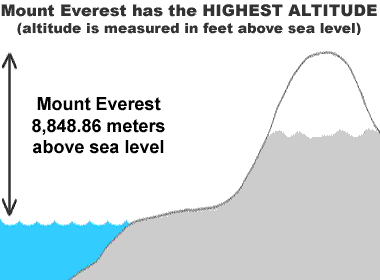
  The "Highest Altitude" 


Almost everyone knows that Mount Everest is the highest mountain in the world and climbers from everywhere travel to Everest hoping to earn the distinction of climbing the "World's Highest".

The peak of Mount Everest is 8,850 meters (29,035 feet) above sea level. This high elevation gives Mount Everest the distinction of being the mountain with the highest altitude. 


highest mountain
An altitude of 8,850 meters (29,035 feet) makes
Mount Everest Earth's highest mountain.

Mauna Kea tallest mountain
      Mauna Kea - observatories in the Hawaiian snow
  © iStockphoto.com by Dan Schmitt

Mauna Kea:
  The "Tallest Mountain" 


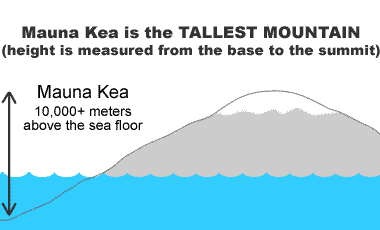
Mauna Kea has an altitude of 4,205 meters (13,796 feet) - much lower than Mount Everest. However, Mauna Kea is an island and if the distance from the bottom of the nearby ocean floor to the peak of the island is measured, then Mauna Kea is taller than Mount Everest.

Mauna Kea is over 10,000 meters tall compared to 8,848 meters for Mount Everest - making it the world's tallest mountain. 


tallest mountain
Mauna Kea rises over 10,000 meters above
the ocean floor making it taller than Everest.

Mauna Kea tallest mountain
      Chimborazo mountain in Ecuador
  © iStockphoto.com by Loic Bernard

Chimborazo:
  "Highest Above Earth's Center" 


Chimborazo in Ecuador has an altitude of 6,310 meters (20,703 feet). Mount Everest has a higher altitude and Mauna Kea is "taller". However, Chimborazo has the distinction of being the highest mountain above Earth's center.

This is because Earth is not a sphere - it is an oblate spheroid. As an oblate spheroid, Earth is widest at its equator. Chimborazo is just one degree south of Earth's equator and at that location it is 6,384 kilometers from Earth's center or about 2 kilometers farther from Earth's center than Mount Everest.


Chimborazo is located near the equator where earth's diameter is greatest.


Wednesday, September 21, 2011

Simple Questions You Won't Believe Science Can't Answer - How a bicycle works


Bicycles have been around since the early 19th century, and its basic design has actually changed relatively little for almost 200 years. You always had two wheels, a frame to connect them and a handlebar for steering, and you required a person completely devoid of shame to ride on it.
Getty
It turns out skintight short-shorts are an improvement in bicycle fashion.
At the very least, you'd think that the guy who invented the damn thing knew what he was doing, but after more than a century of research, science has been forced to conclude that he was probably some kind of sorcerer. The first bicycles were invented, not through any kind of scientific procedure, but by dumb old trial and error. Even modern bike design schools admit that it's not engineering or computer knowledge that make a good bike designer, but instead "intuition and experience."
So, what happens when you ask scientists exactly what makes a bicycle stable? Or what keeps it going? Or how people ride them? Well, odds are they'll either nervously tell you that they have cookies in the oven and run out on you, or if they're honest, they'll give you a pretty big shrug. In fact, top bike researchers admit that, even though some people have come up with equations on how to ride a bike or how they think bikes work, those equations are pretty much fancy icing on top of a cake of cluelessness. One Cornell researcher even says that absolutely nobody has ever come to an intuitive understanding of what makes a bicycle do its thing.
Getty
Science: "We've narrowed it down to either spoke fairies or wheel fairies."
For ages, scientists assumed that the gyroscopic effect (the force that keeps a spinning top from falling over) was the key for a bike's balance. But nope! In the '70s, a scientist disproved that theory.
So then, scientists thought that the principal factor for a bike's stability was something called the caster effect, or trail (something to do with the front wheel's angle away from the frame). But just this year, top bikeologists from Cornell and other universities formed an angry scientific mob, then torched and pitchforked that theory as well. They did this by building a goofy-looking bike that has no gyroscopic effect and no trail, but manages to stay upright nonetheless.
Sam Rentmeester/FMAX
"Look, Ma! No physics!"
So scientists are essentially back at square one, as things such as steering geometry and the physics of stability are all going back to the drawing board. At least you can be secure in the knowledge that the humiliation you feel when you ride a bike is akin to the humiliation science feels when it's asked how a bike stays up.

Friday, September 16, 2011

Windows 7 Advanced Search Operators

Windows users are familiar with the not so perfect search utility in XP. Now with Windows 7 we have an ideal form of searching ability with Advanced Query Syntax (AQS). These are advanced operators that, when used correctly, make file searches easily on target. Windows 7 utilizes an Advanced Search option that can be used instead of Advanced Query Syntax. This was developed with the Windows Search tool as a part of the Windows 7 package. This can be accessed, in a basic sense, from the Start menu, or with Windows Explorer for a specified search in a particular folder or drive.
windows search

By using certain operators and searching syntax, AQS allows for a significant level of precision with search results. As long as you learn the operators, you will be able to find specific results rapidly. This syntax is a gateway to specified search parameters. This saves time and overall effort. When a file needs to be found, the basic Windows Search option will work, but generally you are presented with a list of possibly related files. You would have to sort through the search results list to find the right file. AQS hones this down and gives you the control to quickly find specific files and applications. The syntax is easy to learn and need only be applied to awaken the AQS potential within Windows 7.
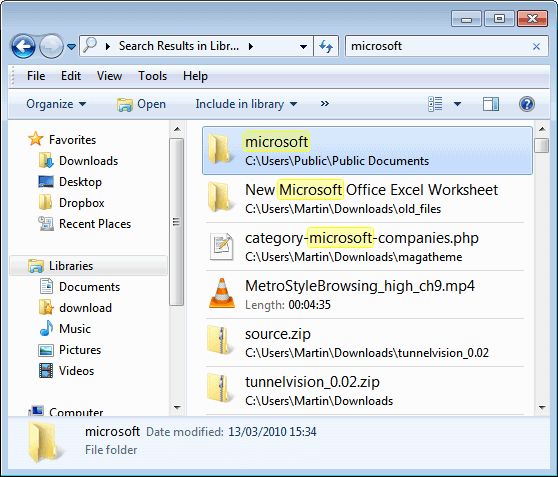
As in the screenshot above, open a Windows Explorer window and search for a term. “Microsoft” was selected in this search and it was narrowed down to the Documents folder as the selected area for the search. The following screen shot is a search for “Reader” on the main hard drive (C :).
windows 7 desktop search

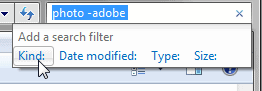
This comes up with many different files. This user is looking for Screen captures, so eliminating the term “Adobe” would be favorable in order to find an SC Reader file. Simply add a dash before words you wish to eliminate from the search results.
This yields all files without “Adobe” attached to the filename. The SC file was discovered, as were other important files that may be of use. The point is that the search option changed and the simple syntax entry of (-) before a term negation will alter the search parameters.
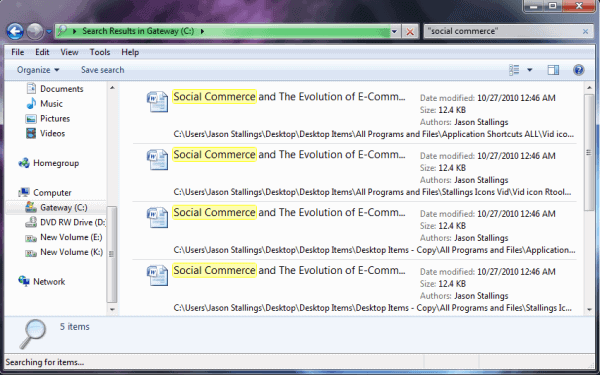
Similar to Google, if you want to search for exact phrases, use quotation marks. In this example, the user has documents on social commerce. Social commerce is entered in quotations in the search field.
desktop search

Apparently the file has multiple copies in a few different locations but it was found quickly nonetheless. Windows Search does not discern between letter cases, so the lettering in the search field is not case sensitive. These are the AQS operators involving text searches:
  • NOT/- : Using “not” in addition to a prefix dash tells the search to exclude items in the following term.
  • AND/+ : “And” and the prefix of the plus sign aims the search to solely include items matching both search terms.
  • Use quotes (“”) to filter for a specified term or phrase
You can take this even further by using search filters. You can search by Kind, Date modified, Type and Size.
search

Some alternatives to using the mouse include the following syntax:
  • search terms >mm/dd/yy
  • search terms datemodified:mm/dd/yy..mm/dd/yy
  • search terms date:past month
This is just an introduction to Using Windows 7 Advanced Search Operators. There are many options for searching with syntax. Some examples include:
  • size:>=4mb < 12mb
  • modified:September…yesterday
  • type:music bitrate:>=180kbps
This is a phenomenal feature in Windows 7. The ability to use natural language in a GUI advanced search is definitely a wise addition to the geek toolbox.

Thursday, September 15, 2011

Singapore lacking in innovation


Depending on who you ask, Singapore is either one of the most innovative countries in the world or underperforming in that aspect.

The 2011 Global Competitiveness Reportby the World Economic Forum clearly thinks Singapore falls in the latter category. While it scores highly for lack of corruption, government efficiency (1st for both), and infrastructure (3rd), it lags behind for adoption of latest technologies (10th), measures that support sophistication of companies (15th), and capacity for innovation (22nd).
But overall, it is still the second most competitive economy in the world, behind Switzerland.
This means that while Singapore is a great place to do business, firms here have not quite caught up with the world’s best when it comes to improving their own processes and developing more innovative products. Government operations, on the other hand, have been on the cutting edge of technology, scoring second globally in government procurement of advanced technology products.
The survey gathers over 13,000 valid responses from 142 economies, for an average of 98 respondents per country, and captures the respondents’ perceptions of their countries.
These findings are somewhat in agreement with INSEAD’s own Global Innovation Index, which ranks Singapore highly for investing resources into developing innovation but penalizes it for the creation of knowledge and the production of creative goods and services.
In fact, when comparing the dividends reaped with the investment made, Singapore ranks an inefficient 94th.
Despite this blemish, there’s a lot of good news for Singapore. The Global Competitiveness Report compares the country quite favorably against other innovation-driven economies. It’s just that Singapore falls short of its own lofty standards.
But the government has only just begun to recognize the important of innovation, and they are now earnestly encouraging firms to innovate by pumping in money to support entrepreneurs and increase productivity in the workplace. Time will tell if these measures have been effective.

Friday, July 22, 2011

How to un-hide the ~/Library folder in OSX Lion 10.7

By default, the ~/Library folder is hidden in Lion. This is a big problem to many of the readers of this site, as many hints involve this folder (especially any involving hidden preferences).

You can easily un-hide this folder for easy access. Simply run the following command in Terminal:

chflags nohidden ~/Library

If, for some reason, you want to re-hide it, you can run the same command using 'hidden' instead of 'nohidden'.

You can actually use this command to hide or unhide any folder. Just put it's path in place of ~/Library. 

Wednesday, February 9, 2011

The best Photography Apps for Android


Cameraphones have come a long way, but you have options beyond point, shoot, and pray to get a great shot. Our favorite photo-related apps for Android snap great shots, add quality effects, edit and share images, and otherwise improve your mobile-photo game.

Camera 360

The Best Photography Apps for Your Android
Camera360 is a camera replacement app that covers a wide variety of camera effects not offered in the stock shooter. HDR-style enhancements, black-and-white shooting, sepia and aging effects for different time periods, high-contrast reverse stock, tilt-shift effects, and so many more. Photo geeks can also shoot with grids, selective focus (on hardware that supports it), set delays, and otherwise make their Android feel more like a feature-loaded point-and-shoot. (Free, $4 for a Pro version with more unlocked effects). [AppBrain]


Adobe Photoshop Express
The Best Photography Apps for Your Android
It's easier to edit and touch up photos on larger screens, but if you want to share something before you get a chance to sync to your desktop—and the pic could use just a little straightening, cropping, lighting balance, or other effects—load it up in Photoshop Express first. It's surprisingly well-stocked for a free app from the Photoshop makers, and it's tailored for making quick fixes with your fingers. (Free) [Homepage] [AppBrain]


Vignette

The Best Photography Apps for Your Android
Vignette combines a great camera, loaded with shooting effects, with a huge variety of post-shot photo effects. Vignette's specialty is framing your shots, along with adding artistic aging, lighting, and other effects that match its namesake. Beyond that, the camera mode also offers some neat tricks, like tapping the screen to shoot and a "fast shot" mode with no recovery or preview time. Recommended if you can't choose between a good shooting app and a great effects tool. (Free, $3.90-ish official version unlocks more effects and frames) [Homepage] [AppBrain]


PicSay

The Best Photography Apps for Your Android
PicSay can do subtle, general edits to your photo's saturation, tint, and the like, but that's not what you use it for. It's an instant markup tool for adding speech balloons, color pops, distortions, lightsabers—stuff that's goofy, fun, and impossible not to forward to your friends. (Free, $4.70 Pro app adds features) [Homepage] [AppBrain]


AndroPan

The Best Photography Apps for Your Android
As you might imagine, AndroPan takes photos that you've taken in a side-by-side series and stitches them into one big panoramic shot. The output varies by phone model, and those that can fine-tune their lighting and exposure settings (mostly to turn off automatic adjustments) will get the best results. Still, even with just your basic smartphone camera, AndroPan gives you a much wider perspective from a very small lens. Image via Panoramio. (Free) [Homepage] [AppBrain]

Retro Camera

The Best Photography Apps for Your Android
If you've ever looked at an ancient plastic camera in a thrift store or attic and though, "Boy, I wish I could shoot with that," Retro Camera should be your next free download. You get five classic old-school camera styles to shoot with, and the shots you take (through a stylized viewfinder) are customized to look as though you developed that camera's film. It's basically a Hipstamatic for Android. (Free, $3 Pro version removes ads) [Homepage] [AppBrain]


3D Gallery

The Best Photography Apps for Your Android
Honestly, this app might be a total knock-off of Google's stock 3D photo browsing application for modern Android phones. But we can't entirely shy away from pointing to it, because Google's Gallery is the best around for Android phones, yet so few have it, due to the custom apps HTC, Motorola, Samsung, and other Android makers insist on installing, even if better alternatives exist. You get a nice view of all your photos, pinch-to-zoom expansion of photo folders, easy selection and sharing, and built-in wallpaper setting. If you approve its connection, 3D Gallery also makes short work of bulk uploading to Picasa, just like Google's own gallery app. Grab it while it's there, because, well, Google might take notice. [AppBrain]


Pixelpipe

The Best Photography Apps for Your Android
If you're shooting stills and video not just for yourself, but for a few different content spots—a Flickr account, a blog, a Twitter stream, and so on—you need Pixelpipe. Shoot your photo with whatever camera app you like, then head into Pixelpipe to send it on its way to all your different media outlets. Pixelpipe supports over 110 services, including personal use apps like Evernote and Dropbox, and video outlets like Vimeo. You'll need to create an account at Pixelpipe's web siteto get all that access, but it seems really convenient once you're past the setup. (Free) [Homepage] [AppBrain]