Showing posts with label macosx. Show all posts

Wednesday, June 26, 2013

10 Best Free Photoshop Plug-ins


perfecteffects 10 Best Free Photoshop Plug ins

One of the most under utilized aspects of Photoshop is the vast wide amounts of free Photoshop plug-ins, which you can download for free of charge. The beauty of Photoshop plug-ins are they open up so many new features to Photoshop, which allows you to use Photoshop outside of the boundaries it was developed for.
This blog post we have carefully scoured the web in search of the best free Photoshop plug-ins, and have compiled all these great plug-ins to into one blog post. All the plug-ins are compatible with Photoshop CS6.

I hope you enjoy the compilation of free Photoshop plug-ins, and would love to hear your thoughts in the comments section below.

1. Perfect Effects 4 Free

perfecteffects1 10 Best Free Photoshop Plug ins
Add a heavy dose of excitement or a subtle amount of elegance to your photos with Perfect Effects 4 Free. Choose from over 70 effects to enhance and stylize your images, including effects to create the popular HDR and vintage looks, textures to add depth and dimension, and borders to add a finishing touch. Instantly add any effect with a single click or combine them to create a look of your own.

2. sinedots filter

sinedots 10 Best Free Photoshop Plug ins

This is a great tutorial to create a great spiral effect using easy Photoshop plugin.

3. Mosaic

mosaic 10 Best Free Photoshop Plug ins
Mosaic makes your photos look as if they were created out of a mosaic tile. Photo-realistic depth and variable tile size and color options give this effect an infinite number of looks.

4. Guide Guide
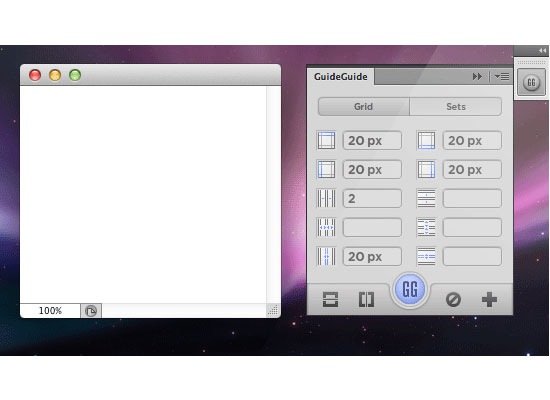
guideguide 10 Best Free Photoshop Plug ins
With GuideGuide, it doesn’t have to be. Pixel accurate columns, rows, midpoints, and baselines can be created based on your document or marquee with the click of a button. Frequently used guide sets can be saved for repeat use. Grids can use multiple types of measurements. Best of all it’s free. Honestly, if you haven’t started downloading it by now, you’re probably a masochist.

5. Cut&Slice me
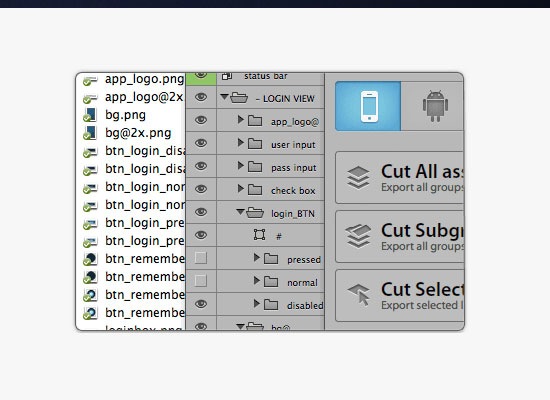
cutslice 10 Best Free Photoshop Plug ins
Use Cut&Slice me to export your assets to different devices in seconds. Improve your workflow by just naming your layers.

6. CSS3Ps
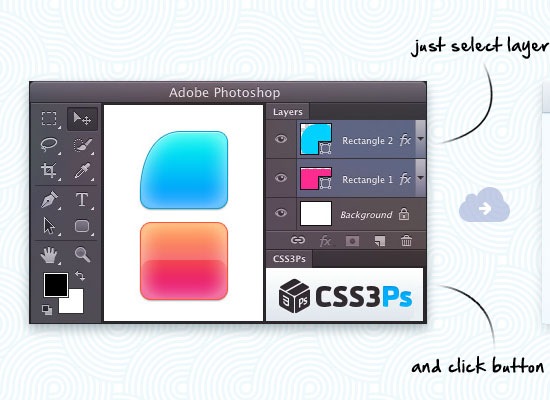
css3 10 Best Free Photoshop Plug ins

free cloud based photoshop plugin that converts your layers to CSS3.

7. Tych Panel 2

tychpanel 10 Best Free Photoshop Plug ins
The ultimate diptych, triptych & ntych automation tool for Photoshop.

8. Filter Forge 4.0

filterforge 10 Best Free Photoshop Plug ins
The second stage of the beta test of Filter Forge 4.0 is now available! The new beta includes support for loop operations that provide new ways to create textures and effects – learn more and grab the beta on the Beta Page.

9. Mr Stacks

mrstacks 10 Best Free Photoshop Plug ins

Mr. Stacks is a Photoshop script that rapidly generates storyboards, stacks, and PDF(s) for CD check-ins, client-ish presentations, and whatever else it is you do. Helping to Nail some of the most monotonous tasks in art direction.

10. Natural Media Tool Kit
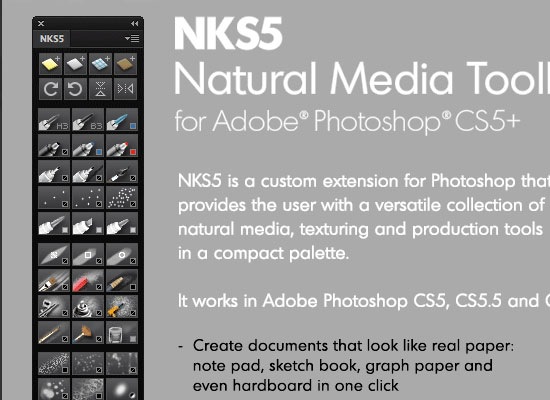
nks5plugin 10 Best Free Photoshop Plug ins
NKS5 is a custom extension for Photoshop that provides the user with a versatile collection of natural media, texturing and production tools in a compact palette.

Thursday, April 11, 2013

Install Mountain Lion on a hackintosh !


iAtkos ML2 : OS X Mountain Lion 10.8.2 (10.04.2013)
iAtkos ML2 : OS X Mountain Lion 10.8.2 (10.04.2013) | 4.79 GB


iAtkos ML2 - OS X Mountain Lion 10.8.2 - the latest version of the most advanced operating system in the world. Mountain Lion includes over 200 new features that enhance your Mac.

With new Messages app, you can send text, photos, videos, contacts, links and documents to any user Mac, iPhone, iPad, or iPod touch - you can even start conversation on one device and continue on another. The new export button allows you to easily send links, web pages, photos, videos, and publish tweets directly through the application to which you are working.

The image of a quick "recovery" system on the hard drive!

in fact the system here, "restored" who is interested in - view the contents of "10.8.2.Base.pkg"

installation:
1. Burn to DVD9 *. Dmg image through TransMac
2. Boot from DVD9
3. Set (during installation, click Customize and select all desired kekstov)
4. Boot from a partition on the hard drive with the installed system
5. To use the system!

System requirements:
The Intel Core 2 Duo or higher (supports 64-bit architecture)
compatible graphics card
2 GB of memory (RAM)

Password to log into the system: do not require a database, enter any data!

http://uploaded.net/file/n1fpcvlq/iATKOS_ML2.part1.rar
http://uploaded.net/file/9c8iwvx9/iATKOS_ML2.part2.rar
http://uploaded.net/file/fv9m1s49/iATKOS_ML2.part3.rar
http://uploaded.net/file/3n3phbzx/iATKOS_ML2.part4.rar
http://uploaded.net/file/jv7hmy6x/iATKOS_ML2.part5.rar

Thursday, February 9, 2012

How to make video Skype calls on HDTV with AirPlay Mirroring

How to make video Skype calls on HDTV with AirPlay Mirroring:
Sometimes you want to make video calls between two groups of people, not just individual person-to-person calls. For such occasions, here are a few little tips that will make the experience of placing video calls on your iPhone 4S a much better one. The goal: Live video calls over the internet to a large HDTV in the family room. The challenge is getting the best video quality possible, as well as making the call as convenient to manage as possible. And believe it or not, the trick is to use a smartphone car mount with a hand mirror. That’s right, a common household hand mirror.

HDTV AppleTV iPhone4S

What You Need to Get Started


To start, you will also need an HDTV with an Apple TV attached, an iPhone 4S and a free Skype account. Why Skype and not FaceTime? Well there are many more Skype users than FaceTime users. And quite frankly, it is much easier to get all members of the family up and running with a free Skype account than to initialize everyone’s iOS and Mac devices with FaceTime.

Mirror Mount iPhone4S

Prepare the Car Mount


Most iPhone docks are designed for someone sitting at a desk. What is needed is a better mount that can allow the iPhone to be better positioned for larger settings. Take any decent smartphone car mount with a suction cup, like this one from Arkon for $15 on Amazon. The suction cup needs a smooth surface to attach to, so try mounting it to any household hand mirror. This set up gives extra stability to the video and the added ability to pass the camera in the mount around easily. The great thing about the car mount from Arkon is that it is just about infinitely adjustable, so no matter how or where you need to place the hand mirror you can angle the iPhone the way you want. And if you happen not to have anywhere to place the hand mirror, just tack up a nail and hang the hand mirror upside down on the wall. Just don’t lock in the iPhone 4S before you make the video call. (The mount’s quick release allows one to attach and detach the iPhone quickly and easily.) Wait until after the call has been established before you put the iPhone into the car mount attached to the hand mirror.

AirPlay Mirroring in Skype

Initiate the Video Call


Placing a video call on Skype with an iPhone is just as easy as chatting or placing a voice call. To increase the quality of the video once the call is established, be sure to use the back camera of the iPhone. Then double click the phone’s Home button and swipe left twice to reveal the volume and Airplay buttons. To display the call on the big screen, just click on the Apple TV you want to use and turn on Mirroring. Once you’ve done that, mount the iPhone in the car mount and experience video calls on the big screen. As a side note, I have found that when placing Mac-to-iPhone Skype video calls, it is easier to establish a video connection when the call originates from the Mac.

If this solution works great for you, you can always shop around for a more attractive mounting solution. You could even invest in a mountable surface that permanently affixes itself to the wall just above your HDTV. For instance, the top shelf of my main entertainment system is made of glass, so I don’t really need a mirror in that room of the house. There are just as many car mounts on the market as there are solutions on how to mount them on or near an HDTV.

Thursday, January 26, 2012

Get Your Game On With These 30 New and Classic Boardgames for Mac

Get Your Game On With These 30 New and Classic Boardgames for Mac:
Are you looking for a good way to have fun on your Mac but don’t really consider yourself a gamer? Perhaps you’re nostalgic for the days when playing a game involved a couple of dice, a colorful board and some interestingly shaped pieces to move around that board.

Well you’re in luck because there are a ton of board game apps out there for Mac. You can stick with the classics (there’s at least one version out there of every big name board game you can think of) or you can try some board games that you might not often find in physical form. Those are less common, but I’m going to take you through the classics and then point you in the direction of some you might not have seen before.


The Classics


Monopoly
Monopoly


Monopoly


Monopoly is our first classic game. It’s available in the Mac App Store for easy download and Electronic Arts does offer an official version of the game. The game offers great graphics and sounds, with a playing style that really reminds you of playing Monopoly with a real board game.

If you want, you can play against 4 difficulty levels of computer players. You can also try out the “teacher mode” where you learn from a computer competitor. Lastly, you can play against up to 3 other players locally. The game doesn’t yet offer an online multi-player mode.

Price: $9.99 (on sale now, 50% off)

Requires: Mac OS X 10.6 or later

Developer: EA Games


Here and Now
Monopoly Here & Now


Monopoly Here & Now


If you’re looking for a modern day take on Monopoly, check out Monopoly Here & Now. It’s a bit pricier and less updated than the EA version of the original Monopoly. On the plus side, you get to become a billionaire!

This game features updated locations like the Texas Stadium and huge airports like LAX instead of train stations. You get to trade at prices that are much more like what you would see today. You get the same basic features – options to play against various difficulty level computer players or the option to play against your local friends and family.

Price: $19.95, free demo

Requires: Mac OS X 10.3.9

Developer: Macsoft Games


Fortune
Fortune


Fortune


If you’re looking for a free Monopoly style game, there aren’t a lot of options for Mac. Fortune seems to be the most common game out there. It’s a similar strategy style game of investing and trading, featuring a board and game play style that are extremely similar to the original Monopoly.

Again, you can play with up to 4 players, both human and computer. It promises to be a very customizable experience. While the graphics and interface leave something to be desired, it’s the closest that you’ll find for free!

Price: Free

Requires: Mac OS X 10.3

Developer: Abdulnasser Alkaabi


The Game of Life
The Game of Life


The Game of Life


The Game of Life was probably my favorite board game growing up so I’ll take any opportunity to play this game. EA’s The Game of Life offers game-play that is very similar to the classic board game. The board is still set up in the same fashion, with similar careers, life cards and more.

The game offers more interactivity and some modern updates. You can sell your first house in order to buy a second, better house. You can interact with the board game in new ways – moving the boat, or ringing the doorbell. It also offers a journal at the end to check out your journey through life.

You can play with up to 6 players. You can play against the computer players, or you can play with your family and friends in party play mode.

Price: $9.99 (currently on sale, 50% off)

Requires: Mac OS X 10.6

Developer: Electronic Arts


The Game of Life - Path to Success


The Game of Life – Path to Success


If you’re interested in a spin-off of The Game of Life, you should check out The Game of Life – Path to Success. While this game isn’t a traditional board game, you still get some of the experience of The Game of Life. It’s more of a game loosely based on the story of Life. You complete levels, working in a time management situation and play mini-games.

This game is fun and simple. It’s good for someone who wants a combination of board game style and time management play. There aren’t any multi-player options, so don’t expect there to be any player interactivity. This is entirely a solo play.

Price: $19.95, free demo

Requires: Mac OS X 10.3.9

Developer: GameHouse


Scrabble
Scrabble


Scrabble


Scrabble is certainly a classic. There are tons of versions of classic scrabble, enhanced scrabble and plenty of free knock-offs as well. This version of scrabble offers 4 different game modes where you can play against 1 of 8 computer opponents or play against your friends and family.

You can play 4 different game modes in this version. You can try the classic mode, race against the clock, play a tournament or set up a custom tournament. It includes hints and even has a scrabble dictionary!

Price: $9.99

Requires: Mac OS X 10.3.9

Developer: GameHouse


Scrabble Plus
Scrabble Plus


Scrabble Plus


If you like scrabble but want some extra features, you should check out Scrabble Plus. This game still offers the classic version of Scrabble, playing against computer opponents or friends and family. It includes hints and a Scrabble dictionary, making it a nice version of classic Scrabble.

The twist is that this particular version includes Scrabble Golf, where you try and reach the green by playing the longest words; Scrabble Battle, incorporating a Risk style element of controlling territories; and Scrabble Wizard which has 3 extra-challenging versions of scrabble.

Price: $19.95, free demo

Requires: Mac OS X 10.5

Developer: MacSoft


Clue Classic
Clue Classic


Clue Classic


Clue is yet another classic board game. This version by MacSoft really captures the original feel of the game – The characters, locations and weapons are all true to the original. The game even captures the Art Deco type feel.

Unfortunately, it doesn’t offer a multi-player option. However, there are hundreds of possibilities and many levels of computer opponents to play against. If you’re a Clue fan, it’s probably worth the investment.

Price: $19.95, free demo

Requires: Mac OS X 10.3.9

Developer: MacSoft


Guess the Character!


Guess the Character!


Guess Who is a popular board game, with several different physical versions being put out over the many years of its existence. Unfortunately, I wasn’t able to find an official version of the game. I did, however, find Guess the Character! a simple knock-off of the game.

Gameplay works in the same fashion as the original – pick a character, ask yes or no questions to eliminate candidates and guess your opponent’s character. The graphics are simple, and your only play options are a simple player versus computer or player versus player. It still captures the spirit of Guess Who, however, so if you’re into the original it’s definitely worth a shot, especially at this low price.

Price: $1.99

Requires: Mac OS X 10.6

Developer: Jandusoft


Ticket to Ride
Ticket to Ride


Ticket to Ride


Ticket to Ride is a strategy board game that basically involves creating as many train routes as possible around the country in order to earn points and best your opponent. It’s a classic, with many different maps and versions available for physical gameplay. There is a Mac version, but unfortunately it’s not nearly as expansive as the physical versions or as cost effective as the mobile versions.

Ticket to Ride offers the basic US map with online capability for ten bucks. Unfortunately, that’s only one map and only one challenge. For greater variety you can buy the Europe, Swiss and 1910 US expansion packs for 5 bucks apiece. These maps can be played online or downloaded directly to your computer for a greater experience with high resolution and online opponent availability.

Price: $9.99 for original, expansions are $4.99 each.

Requires: Mac OS X 10.3

Developer: Days of Wonder


Risk II
Risk II


Risk 2


Risk is a cult classic requires no introduction. This version of the classic game mixes fantastic graphics and animated battles with advanced map options and even more ways to play. You can play against friends or other opponents, against computer players or try the hot-seat mode.

For variety, you can play in multiple locations, or try same-time mode or tournament mode. If that’s not enough, you can also changing the winning conditions – things such as world domination, missions and capitals let you change the game length and provides some great twists.

Price: $29.95, free demos available

Requires: Mac OS X 10.6

Developer: MacSoft


Lux Delux
Lux Delux


Lux Delux


If you’d like a slightly cheaper version of Risk that focuses more on traditional game play but still provides many options for customized games, Lux Delux might be for you. The only option for playing style is the classic option – that being said, you can still change the game to suit you. You can play 11 different computer opponents, of 11 different difficulty levels. Beware: Level 11 is hard!

You can also choose from over 800 maps, they have historical, geometric, geographic and fantasy settings. There’s a huge user base, which is where most of the maps come from. You can create your own maps using the built-in editor and publish it online for others to download. You can also get involved with the fan base in their active forums, or by playing an internet-based game.

Price: $14.95, free 30-day trial

Requires: – Not Stated

Developer: SillySoft


Domination
Domination


Domination


If a freeware version of Risk is what you seek, Domination is the closest match on the Mac app market. While the graphics aren’t the greatest, you still get an experience similar to Risk. There are also no sound effects and no soundtrack.

You can play against computer opponents, or against up to six players. You can create a network within the game for you and your friends. You can also view all of your stats at the end of every game. They do have some extra maps available for download. While it isn’t the greatest gameplay, if you really want a free version of Risk, this should do the trick.

Price: Free

Requires: Mac OS X

Developer: Yura


Catan - Cities & Knights


Catan – Cities and Knights


If you’re a fan of Settlers of Catan, this is a very popular expansion pack that’s available for Mac. This game includes the base game as well as Seafarers and Cities & Knights. This is an exciting strategy game with a 20 level campaign and many story sequences.

If you’d like to stick to traditional gameplay, that’s available against various computer opponents. They have a trial available, so if you’re into strategy games but haven’t played Settlers of Catan before, you can check that out. The game offers nice simple graphics with an easy to use interface.

Price: $29.95, free trial

Requires: Mac OS X 10.5, or you can run it in compatibility mode for OS X 10.4 and earlier.

Developer: Catan GmbH


Oops!


While there isn’t an official version of Sorry! available for Mac, you can check out Oops! as a freeware alternate. The game is a direct knock-off of Sorry! from the board to the cards. Gameplay functions in the same way, and you are able to play against up to 3 computer opponents. You can also go head to head in network play.

The downside of this freeware version is that the computer opponents aren’t exactly the most intelligent. Unfortunately, they do not grasp the strategy of gameplay well which can be frustrating. It’s free, however, so that has to be taken with a grain of salt.

Price: Free

Requires: Mac OS X 10.4

Developer: Erik Hinterbichler


Maxi Dice
Maxi Dice


Maxi Dice


To the best of my knowledge, there isn’t an “official” version of Yahtzee for Mac. There are a few versions for mobile devices, but nothing for the desktop. Maxi Dice is probably the nicest version of Yahtzee that you’ll find for Mac. This game offers 2 styles of Yahtzee – You can play original Yahtzee with 5 dice, or for some added excitement you can play Maxi Yahtzee. This version offers 6 dice and more categories in which to place points.

This game is simple but well-designed. The interface is intuitive, and it makes it easy to pick up and play a game. You can play against friends locally, or against computer opponents.

Price: $9.95

Requires: Mac OS X

Developer: Kristanix


Jahtzee
Jahtzee


Jahtzee


If you want a free way to play the most basic version of Yahtzee, Jahtzee is your game. It offers the most basic functionality of Yahtzee – dice and a digital score card in a very basic interface. If all you want to do is play a game of Yahtzee with family and friends locally, check out Jahtzee. Otherwise, it’s not really worth it without computer opponents or other functionality.

Price: Free

Requires: Mac OS X

Developer: James D. Gutholm


Mancala FS5
Manacala FS5


Mancala FS5


Mancala is a game as old as it gets. I’ve been playing this game since I was young, and it’s definitely one of those “easy to learn, hard to master” type games. Whether you’re new to the game or have been playing for years, Mancala FS5 is a great game.

Offering a simple but well designed user interface with basic customization options the game works well. You can play against a computer opponent, against another player locally or play against one of thousands of people that play online throughout the day.

Price: $4.99

Requires: Mac OS X 10.6.6

Developer: FlipSide5, Inc.


Sigma Chess
Sigma Chess


Sigma Chess


Once you start looking for ways to play “classic” games like chess and checkers you’ll find an abundance of options. This is particularly true because of the App Store where you’ll find tons of chess and checkers apps for only a dollar or two. Sigma Chess is a very straight-forward but full-featured free chess application.

This app offers something for everyone from beginners to master level players. If you’re a beginner, you can select an easy opponent and play a simple game on the 3D chess board. If you’re an advanced player, you can play a computer opponent up to master level 13. You can also annotate and analyze the games you play using an array of built-in features.

Price: Free

Requires: Mac OS X 10.4 – Older versions can be run in compatibility mode.

Developer: Ole K. Christensen


InCube Chess
InCube Chess


InCube Chess


You’ll very easily find a multitude of decent paid chess apps available, so I wanted to provide a twist on chess. InCube chess adds a third dimension to chess. Rather than moving solely along the X and Y axis, you’re also able to move along the Z axis. You’re literally playing chess within a cube.

Because of this entirely new chess playing strategy, the game offers easy opponents and “hint” modes for beginners play. Once you master the game, you’re able to play against harder levels of computer opponents. You can also play locally against a friend.

Price: $3.99

Requires: Mac OS X 10.6

Developer: InCube Games


Fantastic Checkers
Fantastic Checkers


Fantastic Checkers


Would you like a simple, well designed way to play a quick game of checkers? Then this is the app for you. This game doesn’t boast any amazing features, but you’re able to play a quick game against various levels of computer opponents. You can play against 3 levels of computers, or against a friend. Checkers, pure and simple.

Price: $0.99

Requires: Mac OS X 10.6

Developer: Ensena Soft


Checkers Clash Challenges


Checkers Clash Challenges


If you’re interested in a more challenging version of checkers, then Checkers Clash Challenges is worth checking out. This game presents a number of different checkers related challenges that you must beat. There are 60 levels of increasing difficulty so if you think you really know checkers or just want to boost your playing skills you should check this out.

Price: $1.99

Requires: Mac OS X 10.6.6

Developer: Mura Studio


Mahjong Artifacts
Mahjong Artifacts


Mahjong Artifacts


Mahjong is probably one of the most common games on the Mac App Store, and you’ll find just as many ways to play outside of the app store. I find mahjong to be relaxing, but sometimes it can get a little tedious. If you have that same problem, Mahjong Artifacts offers a story mode with specific challenges and a story line to liven up the gameplay at times.

You can also play traditional games in classic mode with 100 different layouts. The graphics are simple and classic, perfect for a mahjong game. For further incentive, you can try for various bonuses and trophies that can be earned for different achievements. You can also try endless mode for a “zen” experience.

Price: $6.99

Requires: Mac OS X 10.6.6

Developer: G5 Entertainment


Moonlight Mahjong
Moonlight Mahjong


Moonlight Mahjong


Moonlight Mahjong is a free Mahjong alternative that offers many different playing styles for lots of variety. The board game is ideal for a multi-touch trackpad for tilting turning the board to see the various tiles but it can also be played with a mouse.

There are 4 types of play available. Scramble mode is an arcade style playing mode where you play against an automated opponent trying to make matches faster than they do. Challenge mode is a full on puzzle mode that requires a lot of strategy but still pits you against a computer opponent. Puzzle mode lets you play challenge mode with no time limits, and relaxation mode allows for scrambling with no time limit or opponents. This is definitely the easiest mode. The game is fun and a great deal.

Price: Free

Requires: Mac OS X 10.6

Developer: Michael Howard


Backgammon Deluxe
Backgammon Deluxe


Backgammon Deluxe


While there aren’t quite as many backgammon games available, there are still quite a few. Backgammon Deluxe is the only one I’ll mention in this round-up. The free version is very full-featured. You can play a simple game of backgammon against a friend or against 3 levels of computer opponents.

The graphics are well done, with an easy to understand interface. The only huge difference between the free and full versions is that the paid version comes with a variety of backgrounds and sounds. This is a nice way to pay a quick game of backgammon, or to really spend some time and learn the strategy behind backgammon.

Price: Free/$0.99 for all backgrounds/sounds

Requires: Mac OS X 10.6

Developer: Ensena Soft


Domino for Mac
Domino for Mac


Domino for Mac


Dominos is another one of those games that’s been around forever. It’s a street game most commonly, with a different type of game play from every region it’s played in. Domino for Mac offers a nice interface for playing Latin American style dominos.

The computer opponents are available in 3 different levels. You can also configure various game rules, including points and the starting piece. The statistics menu allows you to keep track of your long-term wins and losses.

Price: $2.99

Requires: Mac OS X 10.7

Developer: Jose Varela


Chickie Dominos
Chickie Dominos


Chickie Dominos


Chickie Dominos is one of many domino apps available. This one allows you to play the classic “chicken foot” domino style. This is the three prong pattern of play that makes rounds a bit more exciting at times. The game is free but has all of the same features as most other dominos applications. You can play against a computer of a variety of levels, and make some basic changes to the rules at the beginning of the game. Unfortunately, there isn’t an option to play against a friend at this time.

Price: Free

Requires: Mac OS X 10.6.6

Developer: Mindlube Software


Board Game Collection


Board Game Collection


If you’re in the mood for a variety of games, you should definitely check out some board game collections. This particular one, aptly named “Board Game Collection” provides several classic board games. Some of the games included are Nine Men Morris, Checkers, Reversi and Tic Tac Toe along with a number of variations.

While the graphics pain my eyes a little bit, I enjoy the quality and variety of games in the collection. You can play all of the games against the computer or against a friend locally. I’d love to see network play added, but that’s for another day.

Price: $2.99

Requires: Mac OS X 10.7, 64-bit processor

Developer: Uwe Meier


Hoyle Puzzle & Board Games


Hoyle Puzzle & Board Games


Hoyle Puzzle & Board games offers over 1,000 games and variations. You can try classics like chess, checkers and dominoes. You can also try chinese checkers, battleship, mahjong and memory match just to name a few. they also have a number of puzzle games such as word searches and logic based games to keep you entertained.

As is often the problem with massive collections of games, the user interface isn’t the prettiest. However, the amount of games and the customizable features make for a generally enjoyable experience.

Price: $19.99

Requires: Mac OS X 10.6.6

Developer: Encore


Trade Mania
Trade Mania


Trade Mania


I did promise to include a board game style that isn’t based almost entirely on a game found in real life. Trade Mania is one of those games. This game takes from Monopoly (you invest in properties and trade them/collect rent in order make the most money) and also takes from other strategy and time-management based games.

The overall goal is to collect the most money, but rather than only earning money from properties, you also have the added challenges of making and selling products and completing tasks that are given to you on task cards. The game is enjoyable, although not my favorite. While it’s interesting to see the different “classic” games it pulls from, I’m not entirely into it. I think I’d rather play monopoly.

Price: $6.99

Requires: Mac OS X 10.6

Developer: Dekovir, Inc.

Wednesday, January 4, 2012

10.6: Setting up the free iCloud account in Mail

10.6: Setting up the free iCloud account in Mail: This hint describes how to connect your free me.com iCloud account with Mail.app on Snow Leopard.


Open Mail and do the following:

  • Set a new account (+) (in prefs on Mail.app).

  • Set the new account to use IMAP (this is important).

  • Set the incoming mail server: imap.mail.me.com.

  • Set the outgoing mail server: p04-smtp.mail.me.com.

  • Set the user name: yourname@me.com.

  • Use the password associated with your AppleID.

  • Turn SSL on (port 993).


That should do it.

The 20 Best Mac Apps of 2011

The 20 Best Mac Apps of 2011:

As we bid farewell to 2011 and greet 2012, we always like to take a look back and see which apps really stood out over the last year. There’s never a shortage of amazing apps to discuss, the hardest part of this post is simply narrowing down the options to something manageable! We put out a call to all our contributors and Twitter followers and asked for your favorite apps from the past year. The votes are in and the results were loud and clear.


Before we begin, let’s go over the rules. The idea here is to take a look at apps for which 2011 was significant. Perhaps they were released in 2011 or had a totally overhauled new version that blew us away. For instance, in last year’s post, Transmit 4 was a clear and easy choice. However, this year Transmit 4 won’t be on the list. It’s still an amazing app, but 2011 wasn’t really that significant in the Transmit story. Now that you get the idea, let’s jump in and take a look at some awesome apps that made big waves in 2011.


The Mac App Store


I can think of no better way to start off this post. 2011 was most certainly the year of the App Store. Ever since the iOS App Store first debuted in iTunes, many Mac users knew that it was inevitable that the same model of app distribution would eventually come to the Mac. For better or worse, the App Store arrived in early 2011 and since then users have downloaded over 100 million apps!


There are plenty of reasons to not like the App Store. Apple is a harsh dictator when it comes to what is and isn’t allowed, developers are forced to share their frequently meager profits with Apple, etc. However, you can’t help but appreciate how simple it has become to find, download and even update software on the Mac platform. It’s truly a remarkable development that has changed the way we all use our Macs and will no doubt continue to drive development for years to come.


Price: Free (Built into Lion)

Developer: Apple


Twitter for Mac


When Twitter gobbled up AteBits to get their hands on the best iPhone Twitter client on the market, we all thought it spelled doom for the beloved Tweetie Mac client. For ages Tweetie fans watched as other clients evolved and took on new features, made possible by the ever-changing Twitter network. Tweetie however stayed behind, collecting dust. Despite this, many of us (myself included) still clung to this client above all others. Lack of continued development aside, it was still the best experience around.


With the arrival of the App Store, something amazing happened. The long rumored Tweetie 2 was released under the simple new title of “Twitter.” It kept everything we loved about the old version, got a sweet Lion-centric facelift before many of us really knew what that would mean, and took on all the new features that Twitter had amassed such as lists, official RTs and trends.


This outstanding free app was the first Mac App Store success story and quickly climbed the most downloaded charts. Unfortunately, it also directly led to the widespread demise of the third party Twitter client world. In a seemingly cruel move, Twitter had opened up their platform for development, allowed developers to make amazing strides and innovations that took the network to new heights, then simply wrote a check for that innovation and took over the market themselves, squishing the indie developers who helped make Twitter what it is today (they took over TweetDeck as well). Now, going into 2012 it looks as if Twitter for Mac is back at the bottom of the list of Twitter’s concerns, staying stagnant as other apps in the family are completely overhauled.


Price: Free

Developer: Twitter


Reeder


In June of 2011, Reeder finally exited beta and hit the Mac App Store. This app has single handedly overhauled a tired and boring Mac RSS reader industry. Building on iOS design trends and its previous success in that market, Reeder brought a beautifully minimal reading experience to the Mac in a perfectly widescreen friendly three column interface. It also featured a contracted view that gives a nod to the Twitter for Mac interface with its skinny left sidebar.


Finally, reading our RSS feeds had begun to feel a lot less like reading email and a lot more like an enjoyable daily experience. Since Reeder debuted, copycat developers have been churning out clones at full speed. Nothing though has quite matched Reeder’s charm and beautiful simplicity and users continue to be fiercely loyal.


Price: $9.99

Developer: Silvio Rizzi


Fantastical


While Apple was busy pushing out a cheesy new iCal interface, the real iCal revival came from the third party market. The most notable entrant in this category is without a doubt Fantastical, which truly lives up to its name.


Released in May, Fantastical immediately became the quintessential menu bar calendar client. The interface is attractive and is well beyond the generic offerings made by other developers, but where Fantastical really stands out is in its functionality. The natural language data entry is a dream. Type “meet joe at 5pm on Monday” and Fantastical will instantly create a corresponding event in iCal with the proper data and can even automatically create multiple reminders so you won’t forget. Try it out and you’ll be amazed at how quickly you become dependent on this intelligent personal assistant. Even though it tightly integrates with iCal, it’s so good as a standalone app that I can’t even remember the last time I actually went into iCal itself.


Price: $19.99

Developer: Flexibits


iA Writer


2011 was also the year when minimal fullscreen text editing hit full stride. It’s interesting to see a genre of apps go through a widespread removal of features and come out better for it, but that’s exactly what text editors have done. Many writers now value the simplicity of zero interface and little to no text formatting as a powerful tool to write without distractions.


In this category, iA Writer stands out as a clear crowd favorite and innovative forerunner. It may have built on the success of previous apps like WriteRoom, but it quickly set itself apart with unique features like auto-markdown formatting, focus mode and iCloud support. Also check out Byword, a similar app that has even better Markdown integration.


Price: $8.99

Developer: Information Architects


Pixelmator 2


Pixelmator is the developer fairy tale story. Photoshop alternatives have historically sucked, it seemed that no one could come up with a decent yet affordable alternative good enough for professionals to not scoff at. Then came Pixelmator, a super slick and surprisingly powerful graphics editor that struck App Store gold nearly as soon as Apple’s new store arrived.


Now in its second version sporting tons of new features and capability, Pixelmator is better than ever. It’s so good that it was just named “App of the Year” by Apple. At under $30, Pixelmator is an amazing value. You’ll be hard pressed to find another app that offers so much for so little.


Price: $29.99

Developer: Pixelmator Team Ltd.


Sparrow


On last year’s list, Sparrow was a shiny new Gmail client with a spin: it borrowed the Tweetie interface. This represented a pretty radical shift in email interface design and was initially a bit of a quirky and interesting email alternative.


Today Sparrow is a mature and highly impressive email app that supports just about every email service you could need. The features have caught up to the interface and thousands of users have made Sparrow their one and only choice for email. If you haven’t tried it yet, it’s time to take the plunge. Sparrow will rock your world.


Price: $9.99 (free ad-supported version available)

Developer: Sparrow SAS


Growl


Growl has been around for ages as the go-to app for notifications on your Mac. It’s always been free and open source, but last year the team decided to take it into the App Store and begin charging a nominal $1.99 to help ensure development stays active.


Along with this change was a complete overhaul of how Growl works (largely due to restrictions from the App Store no doubt). Growl is no longer a Preference Pane, it now sits in your menu bar and has a nice chunk of new features and themes. The best update is the ability to view notifications that you missed while you were away. If you haven’t tried Growl in a while, it’s time to take another look.


Price: $1.99

Developer: Developer Name


Wunderlist


Wunderlist was released at the end of 2010, which means most of its growth and press was in 2011. I simply can’t say enough about Wunderlist. This app and its iOS counterparts changed everything in the productivity category. Just as we had all gotten used to the idea that simple todo list apps should cost upwards of $50 and have limited to no syncing ability, Wunderlist releases with a beautiful customizable interface, awesome todo functionality, multi-user collaboration and seamless cloud syncing, which now works across just about every major platform… free.


It sounded too good to be true but here we are a year later and they still haven’t surprised us with hidden fees or some weird cost structure. There are now versions for Mac, iPhone, iPad, Windows, Linux, Android and the web and you can use them all together without instantly updating lists.


Price: Free

Developer: 6Wunderkinder


Raven


It’s not often that we see a new web browser that truly attempts to take a different approach to web browsing. Safari, Chrome and Firefox are all unique in their own ways, but they’re all still at their cores the basic web browser format that we’ve been using for years.


Raven is something else entirely. It’s completely built around the concept of simplifying how you use web apps. I’ve lost count of how many apps on this list borrow the Twitter for Mac sidebar and this is another, this time it’s used as a “Smart Bar” that functions as an awesome way to switch between your favorite sites and web apps. When you click on a Raven App in the sidebar, it expands and gives you a dedicated menu for that item. So for the Google app, you can quickly switch between the various Google services that you use regularly. I use Raven daily and continually appreciate its unique charm.


Price: Free

Developer: RavenCo


Spotify and Rdio


Neither of these apps was new in 2011, but something important happened that changed everything for both: Spotify came to the United States. This caused a huge influx of new Spotify users and ushered in the era of complete radio freedom where users can choose exactly what they want to listen to.


Before the arrival of Spotify and its awesome free ad-supported plan, Rdio pretty much owned this category in the U.S. (and had only premium paid accounts), but now with the extra competition Rdio has had to follow suit and launch its own free plan that’s arguably even better than Spotify’s (no ads, just a play cap). These are important developments in radio history and could have a major long term effect on how we all listen and pay for music.


Price: Free (paid plans available)

Developer: Spotify Ltd and Rdio, Inc.


Espresso 2


Espresso 2 is the second iteration of MacRabbit’s awesome coding environment for Mac developers. It has everything you loved from Espresso 1 (theming, auto-updating live HTML previews, code folding, smart snippets, auto complete) with some awesome new features like the ability to Xray live previews to analyze their code structure and load in and tweak any site on the web.


The biggest and best feature of this update is that CSSEdit has been discontinued and integrated into Espresso, which means all those awesome visual CSS controls and manual editing tools are rolled into one super awesome app. If you’re a developer, you simply have to check this app out.


Price: $79

Developer: MacRabbit


Skitch


Skitch is by no means a new app, it’s been at the top of our list for screenshot annotation and sharing apps for a while. However, last year Skitch hit the big time and was purchased by the amazing Evernote team.


This means great things for Skitch both in the short and long term. In the short term, both the full version of Skitch and its accompanying sharing service were made completely free to all users. In the long run, you’ll start to see better integration with Evernote and a lot more versions (Android has already been released, iOS is in the works).


Price: Free

Developer: Evernote


Alfred 1.0


Readers of AppStorm are no stranger to Alfred. We’ve been gushing about this friendly and easily approachable launcher since day one. What started as a simple way to launch apps though has grown into a workhorse of power and functionality that even rivals the feature set of Quicksilver.


Last year, Alfred grew and matured quite a bit and even hit that ever important milestone: the official 1.0 release. Alfred now has an awesome extension system that is driving its ever expanding usefulness, improved clipboard history and snippet functionality, and a fully customizable global hotkey system that allows you to set keyboard shortcuts for all kinds of actions on your Mac. There are only two types of Mac users: those that use Alfred and those that should use Alfred.


Price: Free (£15 for the Powerpack)

Developer: The Alfred Team


Wren


Five bucks for a Twitter app with no timeline? Are you nuts? Perhaps, but we really fell for this awesome little app. Wren helps you keep up on your tweeting during the workday without getting sucked into the inescapable productivity killer that is Twitter.


The app is gorgeous and has lots of great features like multiple account support, drafts, auto complete for usernames, global hotkeys, link shortening and a fullscreen mode.


Price: $4.99

Developer: Kevin Smith


Producteev


Wunderlist isn’t the only free todo app on the market offering awesome functionality and instant sync between multiple platforms. Producteev has been in this game for a while now and finally released a native Mac client in mid 2011. The Producteev Mac app is super attractive and allows you to completely manage your accounts, projects and lists.


If you’re not a fan of the simplicity of Wunderlist, check out Producteev. It has a ton of amazing features and is more of a full on project management tool than a simple todo list manager. You can collaborate and communicate with other users, access an in-app notification center, schedule repeating tasks, attach files and use natural language input to schedule tasks.


Price: Free (paid plans available)

Developer: Developer Name


Carousel


As we all continue to sink deeper into our addiction to Instagram, an iPhone-only photo sharing social network, we are constantly on the lookout for new and great ways to experience the service. One of the areas that’s really starting to take off in this niche is Mac clients. Though you can only upload to Instagram via an iPhone, the developer API does allow you to view and interact with the service to a limited extent from almost anywhere.


Our favorite Instagram Mac client is Carousel. It perfectly captures the retro charm of Instagram and is a great way to view photos from your friends, like and comment on images, and even save them to your Mac.


Price: $1.99

Developer: Mobelux


Day One


Day One made a huge splash last year as the best new journaling solution for Mac and iOS. This seemingly simple app helps you focus on writing without skimping on the important features you want and need.


With Day One you can make quick entries via the menu bar or use the attractive main window, set up daily reminders to write, view your entries in a calendar mode, sync entries to the iOS app via Dropbox and password protect your information to keep it safe from prying eyes.


Price: $9.99

Developer: Bloom Built


Boom


Laptop speakers suck, especially when combined with Internet video streaming with a low quality audio stream. It’s often the case that you have to put on headphones just to hear, which is definitely not ideal if multiple people are watching and listening.


Enter Boom, an app that caught a lot of attention at the 2011 Macworld Expo. With Boom you can easily boost the volume on your speakers so you can actually hear that show on Hulu. You can also target specific audio and video files to boost so they’re louder wherever you listen to them, even on your iPad and iPhone.


Price: $8.99

Developer: Global Delight Technologies


What Were Your Favorites?


That concludes our list of the twenty best Mac apps in 2011. We had plenty of brand new apps that were instant classics and even saw some old faces that continue to push out great updates and impress us year after year.


Leave a comment below and tell us about your favorite apps this year. Did we miss anything that deserved to be on the list? How did 2011 make your life better as a Mac user? We want to know!